← Releases
Release 2025.12
The festive season is just around the corner – and we already have a very special gift for you! Our latest release improves your assembly planning and adds a little extra joy to your daily work.
The highlights:
- More transparency about tasks and time blocks with Add-On Time Management
- Document assembly constraints quickly and intuitively
- Improvements of the user experience
Customers with Long Term Support (LTS) will receive these updates with the next LTS release in March 2026.
Analyze / Time Analyses
Time Analysis Under Control: Greater Transparency Thanks to Task Types
In assembly planning, precise Time Analyses are the key to efficiency, quality, and continuous improvement. With our new functions related to Task Types, we are taking the analysis of work processes to a new level—flexible, clear, and intuitive.
What are Task Types?
Task Types enable to group and evaluate work processes using individually defined combinations of time blocks. Whether walkways, scanning processes, or ergonomically relevant activities—you determine which blocks are relevant for your analysis. You can save, manage, and reuse them as task types.
Example: You want to check whether scanning processes are actually being carried out at a specific workplace and how much of the total cycle time they account for. With task types, you can summarize and analyze all scanning processes and see whether and to what extent this activity contributes to the cycle time of a workplace. You can see the maximum and minimum values per order for scanning operations at a workplace. This allows you to identify potential for optimization of the process and find incorrectly documented time blocks in no time at all.
Your advantages at a glance
- Fast error detection & optimization potential: Find out in no time at all which work processes or workstations contain certain activities (time blocks). This allows you to uncover discrepancies in time analyses and identify specific optimization opportunities. (Workplace Diagram, Workplace KPIs)
- Individual focus: Focus on the codes or code combinations that are relevant to you – permanently stored or defined ad hoc. This means you always have an overview. (Analyze / Task Types)
- Aggregated evaluations: Get a summary and visualization of how much time is spent at which workplace on certain activities. This allows you to see at a glance where action is needed. (Line Balancing KPIs)
- Intuitive operation: Task Types can be easily created, edited, imported and exported. Integration into existing views and diagrams ensures a seamless user experience. (Order Types Diagram)
- Transparency at all levels: New columns and filter options in the Task Lists as well as minimum and maximum values in diagrams make the analysis even clearer. (Task lists, Workplace Diagram)
Who is this intended for?
Whether in planning, process optimization, or team leading, the task types provide you with valuable insights into your manufacturing processes, allowing you to make targeted adjustments where they are needed most.
With task types, you can keep your time analyses under control – for more transparency and quality in assembly planning. Try it out and experience how simple and effective the analysis can be!
Documentation / Line Balancing Constraints
Improvements of the User Experience
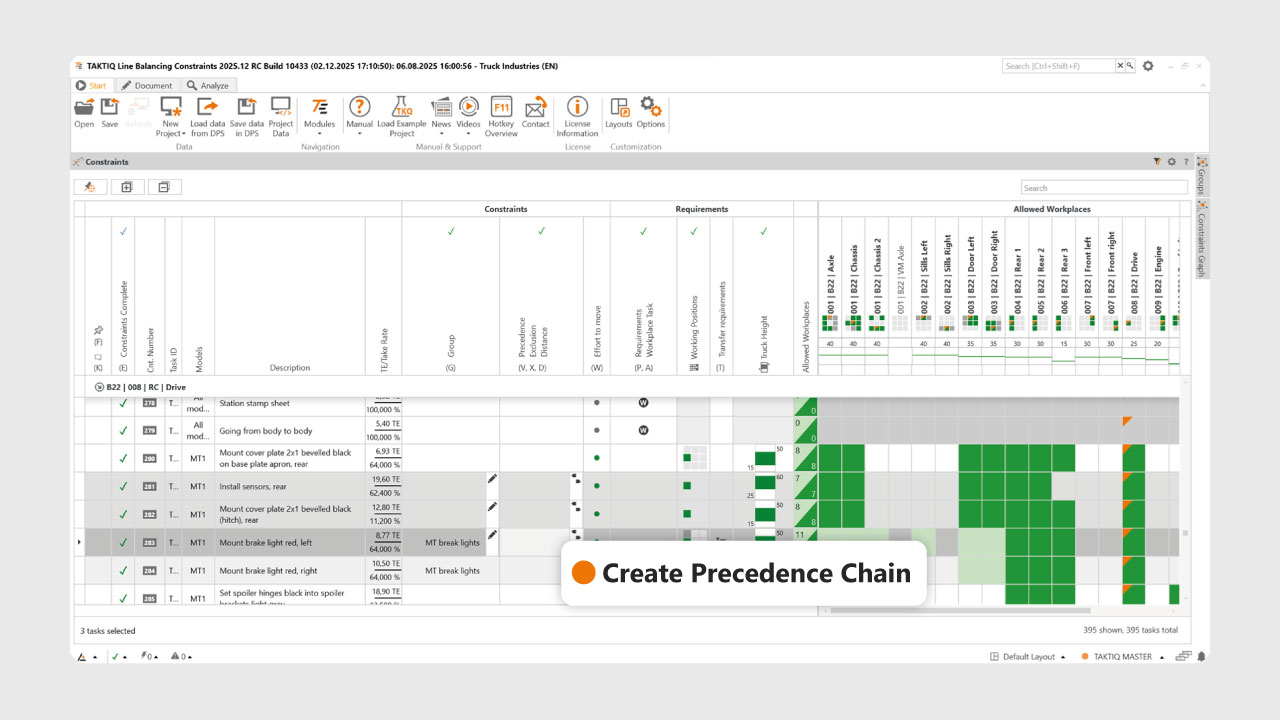
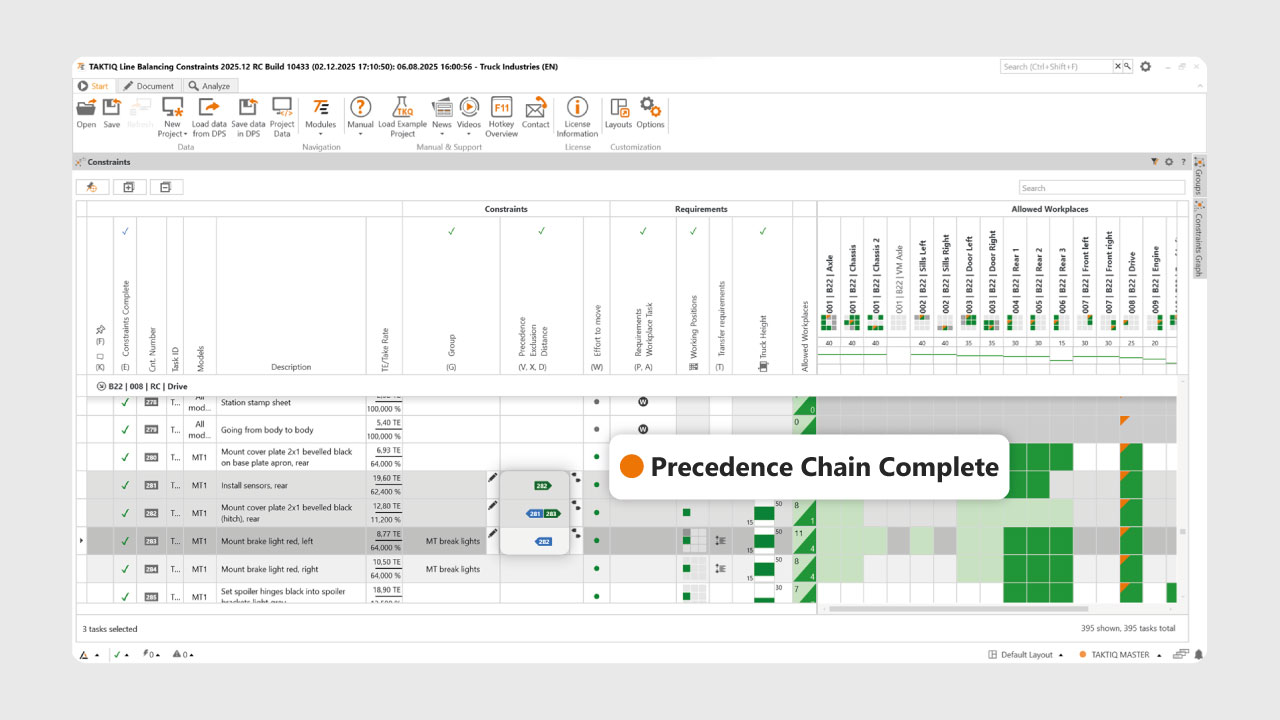
With the 2025.12 release, we are speeding up the maintenance of task precedence between multiple operations and simplifying the documentation of task groups. It sounds like a small thing, but it saves a huge amount of time if you want to document line balancing constraints for a large number of operations.
Link tasks as a chain with one click
Would you like to link several tasks in their current assembly sequence? No problem: Select the desired tasks simultaneously (Ctrl + Click) and then click the new quick button Priority chain or press the S key. The priority chain is now fully documented and will be respected during the next optimization.
Edit and rename groups faster
Customizing and renaming task groups is now easier than ever: With one click on the edit icon in the group column, you can directly assign all selected tasks to a group or change the group name. Regardless of whether you want to customize existing groups or create new groups – everything can now be done directly and intuitively with one click, without detours via the context menu.
With these two new features, you can make your process maintenance even more efficient – for smooth and modern assembly planning.
Further Improvements
- Export and import of ergonomic attributes: Elaborately maintained ergonomic properties of workplaces can now be saved as an Excel file at the touch of a button. This means they can also be easily transferred to other workplaces via import.
(Documenting / Ergonomics) - Overview of linked parts in tasks: After we recently improved the display of feature rules, the new user control with long names and text search is now also available on the parts column in task lists.
(Analyze / Tasks) - Longer display of order types in workplaces, variant overview and drift analysis: The known order types for the targeted analysis of variants can now be displayed with up to 10 characters instead of a maximum of 4. This enables differentiation even if the first 4 characters are identical.
(Analyze / Order Types) - Better default widths for views: The initial widths of the frequently used Tasks List and Task Store views have been optimized so that information can be read directly. If this is not the case for your data, simply adjust the widths individually. Your last setting is saved automatically.
(Start / Operate & Navigate) - Interactive preview mode on the entire row: The arrow for starting the popular interactive preview mode for moving operations is now displayed on the entire row (previously only on the description column)
(Optimize / Line Balancing)
All TAKTIQ Modules at a Glance
Expand TAKTIQ flexibly with our modules. Customize the solution to your individual production and achieve maximum benefit for your specific requirements.


