← Releases
Release 2026.2
Working closely with experienced partners, we will be combining the best of each field even more closely in the future — from first-class 3D line planning to in-depth expertise in time management. This combination creates value for you: more precise planning, more efficient processes and solutions that deliver measurable progress.
Highlights:
- TAKTIQ & DELMIA: Seamless integration for efficient planning
- Systematically improve production lines with TiCon & TAKTIQ
- Edit time analyses more efficiently
Customers with Long Term Support (LTS) will receive these updates with the next LTS release in March 2026.
Optimize / Line Balancing
TAKTIQ & DELMIA: Seamless integration for efficient planning
Together with our partner Dassault Systèmes, we implement a seamless planning chain for your assembly line: from initial process planning and rough line balancing in DELMIA to optimizing your production with TAKTIQ. The necessary interfaces are currently under development and will be made available to you step by step to enable fast, bidirectional data exchange in the future. With the 2026.2 release, you can already retrieve line balancings from Delmia and use them as base plan states in TAKTIQ.
What does that mean specifically?
DELMIA lays the foundation: you create workplaces and perform an initial assignment of tasks. From there, you move on to TAKTIQ, where you perform more detailed line balancing using familiar analysis functions, precise simulation, and interactive optimization. You identify bottlenecks early on and make informed decisions.
The planning data refined in TAKTIQ can be synchronized with DELMIA at any time in the future. You benefit from the strengths of both systems by creating a continuous workflow from previously separate planning steps.
Interested? Your experiences are valuable!
Your feedback and requirements for the joint use of both systems help us to design a tailor-made and practical solution.
Feel free to contact us—we look forward to discussing your needs and developing tailor-made solutions for you!
Optimize / Line Balancing
Perfectly synchronized: Systematically improve production lines with TiCon & TAKTIQ
Since release 2025.10, MTM time blocks can be loaded from TiCon (Windows/Web) and used in TAKTIQ. With this release, we have expanded the standard import function: You can now load a complete line balancing from TiCon at the touch of a button! You can decide whether to transfer the workplaces and the initial task distribution from TiCon or whether to load only the tasks including their time analyses and then distribute them yourself to the workplaces in TAKTIQ. Subsequent updates of tasks (e.g., loading new task times) or workplaces (e.g., loading new cycle times) are also supported. The reverse direction is already in planning, so that in the future you will be able to continue using the optimizations from TAKTIQ in TiCon.
Join us for a one-hour webinar to learn how TiCon and TAKTIQ work together to enable accurate time recording and comprehensive optimization of your assembly line. From data collection to KPI-based line balancing —everything in one integrated workflow.
Wann: 18.03.2026 11:00 – 12:00 MEZ
Document / Time Analyses
Edit time analyses more efficiently: Copy, paste, and time block management
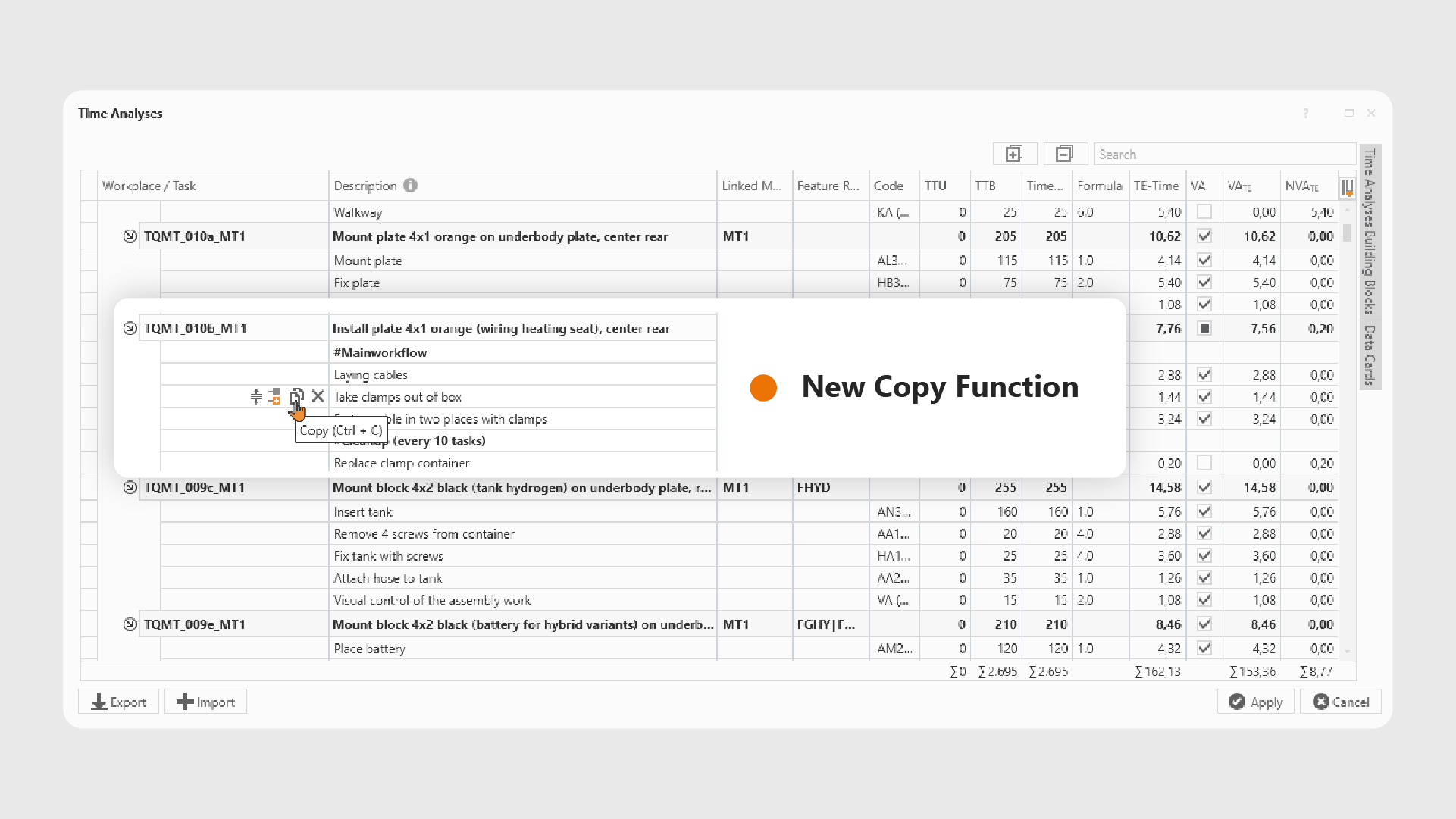
You can now easily copy and paste time analysis rows in TAKTIQ – ideal if you want to reuse existing analyses.
Under Document / Time Analysis and when editing tasks in the Time Analysis tab, you will find a new copy icon in the first column. Alternatively, you can use Ctrl + C. Pasting is just as easy: use the paste icon in the first column or Ctrl + V to paste the copied content exactly where you want it. Multiselect is also fully supported: simply select multiple rows using Ctrl + click or Shift + click and then copy them using the icon or keyboard shortcut.
Do you use customized time blocks? You can now import and export time blocks centrally for the entire planning area. This allows you to transfer time blocks even faster — e.g., from a TKQ file — to a new planning area without having to maintain them manually. The time analyses can then be further processed and used as usual during line balancing.
Further Improvements
- Save cycle time factors in TKQ files, plan states, and projects: The future topic of “variable cycle times per order” has already been supported in parts of the software for some time. Now you have the option of saving the individually documented cycle times as well. This innovative planning method can now be used productively. Contact us if you are interested in activating this add-on!
(Document / Orders) - Easily select models for tasks: When editing task models, an integrated search field is now available. This allows you to quickly and specifically find the right model, even when there are large numbers of models available.
(Document / Tasks) - Easy filtering of task lists by model: From now on, you can filter the columns for Models and for Model Descriptions in task lists much more easily. Simply choose whether you want to display only the tasks for a specific model or the tasks for a selected set of models.
(Document / Tasks) - Selectively import task constraints and master data: When importing tasks and workplaces from Excel, you can now specify exactly which task information to be transferred. Instead of always overwriting the entire task as before, you can now choose whether you want to import only master data (description, feature rule, TE, etc.), constraints, requirements, or other attributes such as comments or markings. This gives you full control over your task data and allows you to precisely determine which information is updated. It is now possible, for example, to add constraints to existing tasks.
(Document / Tasks)
All TAKTIQ Modules at a Glance
Expand TAKTIQ flexibly with our modules. Customize the solution to your individual production and achieve maximum benefit for your specific requirements.


