← Releases
Release 2026.8
TAKTIQ Release 2026.8 strengthens assembly constraints as a core capability: properties can be documented more flexibly and more consistently, and specifications from other sources now work alongside your own documentation. New on top of that are REFA time studies taken directly on the line and the IQ Pilot, now open to every user.
Highlights:
- Maintain properties consistently and with less effort
- Use constraints from every source together
- Public Preview: REFA time studies on the line
- IQ Pilot now open to all users
Customers with Long Term Support (LTS) will receive the new features with the next LTS release in September 2026.
Questions about the release?
Just write to me!

Share post
Document / Workplace Properties
Easier property maintenance: define once, use again and again
Properties and requirements decide which task can be performed at which workplace. Until now they had to be maintained on each individual workplace and with freely typed values. Across many workplaces that adds up. Over time it also produces spellings that mean the same thing but no longer match. Release 2026.8 addresses both.
From the station down to the workplace: maintain once, valid everywhere
Properties can now be stored on any element of the physical plant structure, on a station just as much as on the levels above it. From there they are inherited automatically all the way down to the workplace.
This saves maintenance effort and reflects reality more closely. A typical example: a particular tool is available at a station, but one workplace at that station uses a different one. For exactly these cases, inherited properties can be deactivated or overridden at any level. The display always shows whether a property is maintained or inherited.
Predefined properties and heights: no more sprawl
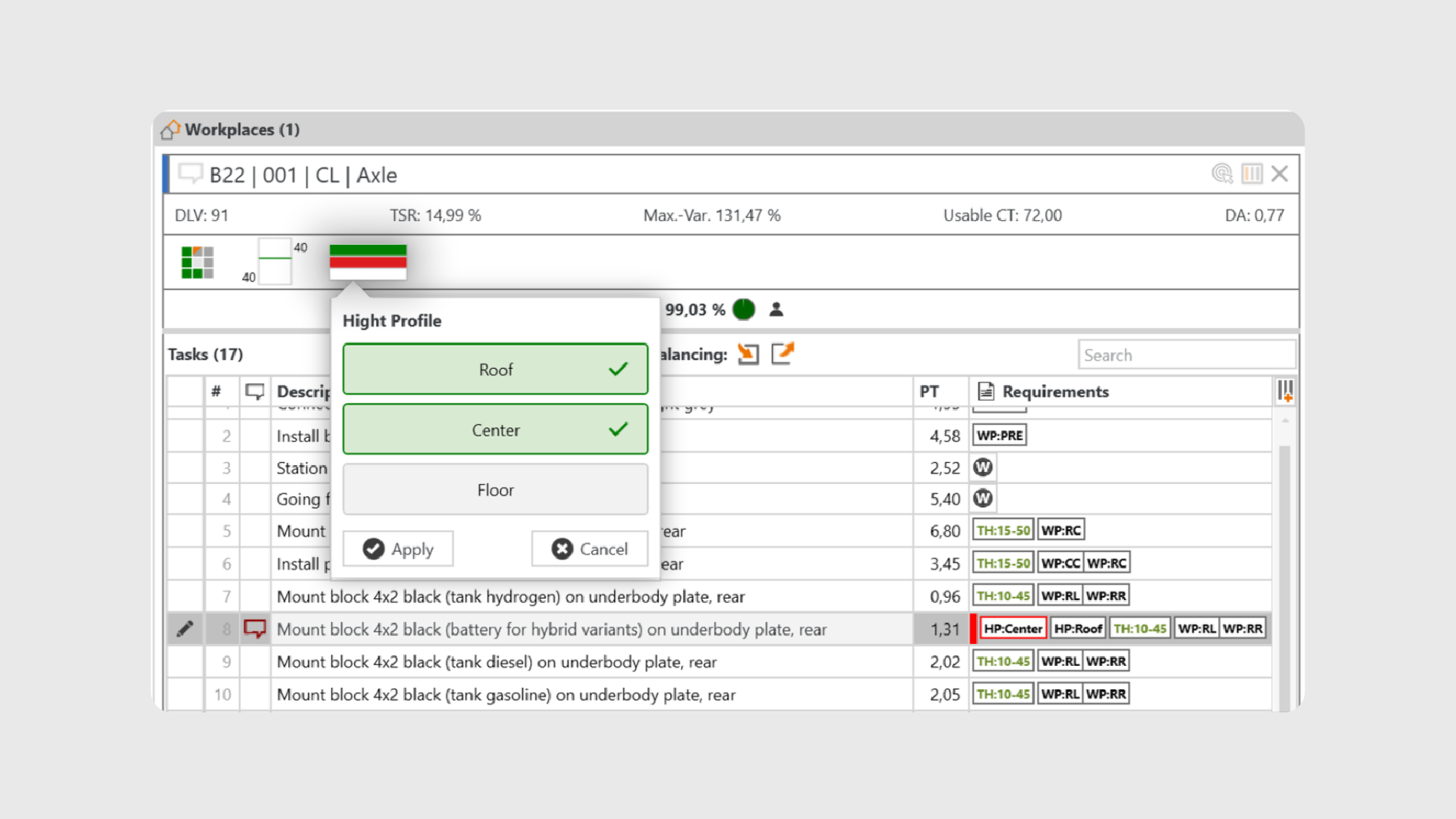
Freely typed property values create variants over time that actually mean the same thing. Constraints then stop working reliably. With Release 2026.8, properties can be set up in Administration as a predefined property with a fixed, ordered list of values.
Users then pick values instead of typing them, on workplace properties just as on task requirements, where they can also be combined with AND or OR. Values that deviate from the specification are clearly flagged as a warning. Legacy data becomes visible without anything being changed behind your back.
Heights get their own property type: instead of individual centimetre values you work with predefined heights that are shown as steps. That makes working heights comparable at a glance, and it reduces the number of distinct values to what planning actually needs to tell apart.
The result: properties are defined centrally once and used consistently everywhere: less maintenance effort, fewer deviations, and requirements that reliably take effect.
Document / Line Balancing Constraints
Constraints from several sources: combine instead of overwrite
Well-documented assembly constraints are the key to efficient planning and automation. They decide whether the line balancing you end up with holds up in practice. Not theory, but results you can rely on in production planning.
Assembly constraints rarely originate in one single place. Some come from a leading source system, some are derived automatically, for example from historical line balancing since Release 2026.6, and some are documented directly in TAKTIQ. These sources used to compete with each other: anyone who adjusted something in TAKTIQ risked losing it with the next update from the source system.
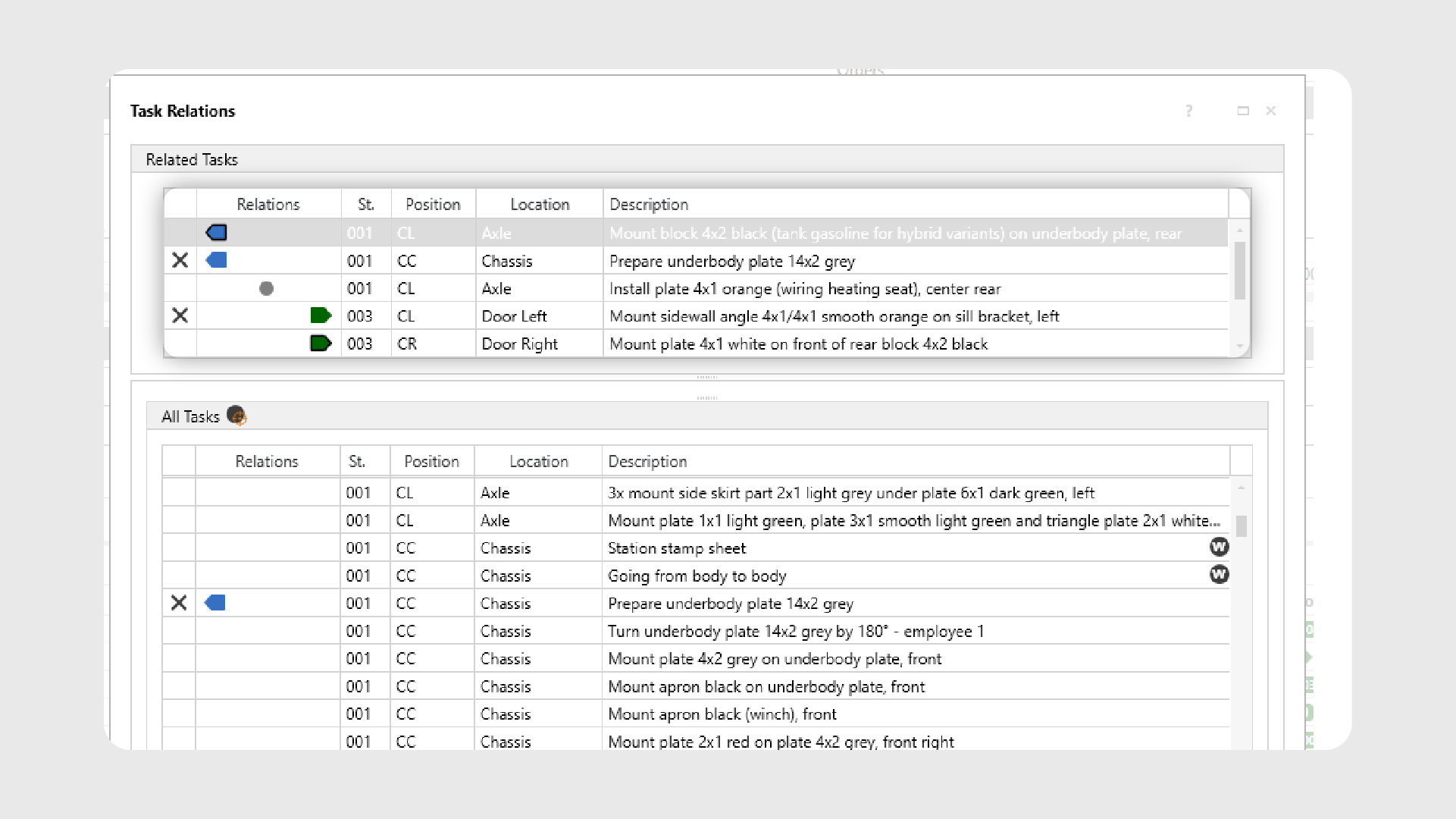
Release 2026.8 resolves that conflict at its root. Specifications from other sources are no longer overwritten but kept alongside the task. TAKTIQ calls them readonly task relations. Their content cannot be changed or deleted; ownership stays where the data comes from. You still stay in control: every readonly task relation can be set active or inactive.
So which one applies right now?
A clear order of precedence answers that: a value documented in TAKTIQ always takes priority over a readonly specification, which in turn takes priority over an inherited value. As soon as a documented value exists for a property, the readonly specification steps back. Remove the documented value again and it takes effect once more. Nothing is lost, and nothing has to be documented twice.
For task relations, TAKTIQ goes one step further: readonly and documented relations can apply at the same time. Whether they should is decided centrally for the whole project, not task by task. A few clicks are enough to try out how the line balancing behaves with or without the specifications from the source.
Import precedence graphs from other sources
If a precedence graph exists outside TAKTIQ, a new import brings it in: predecessors, successors, exclusions and distances. The import writes exclusively into the readonly relations and replaces them completely. Whatever is documented in TAKTIQ stays untouched and can sit alongside it at any time.
In the task lists, TAKTIQ always shows the constraints that currently apply. Anything that has no effect right now becomes visible when editing. That keeps the lists readable without losing information.
The result: specifications from other sources and your own documentation in TAKTIQ no longer rule each other out. Constraints stay current, traceable and under your control at all times.
Document / Time Analyses
REFA time studies: directly in TAKTIQ or via web app
Time analyses are the foundation of reliable planning, and which method is used differs from plant to plant. With Release 2026.8, REFA becomes a fully supported method in the Time Management Add-On, alongside MTM UAS and MODAPTS.
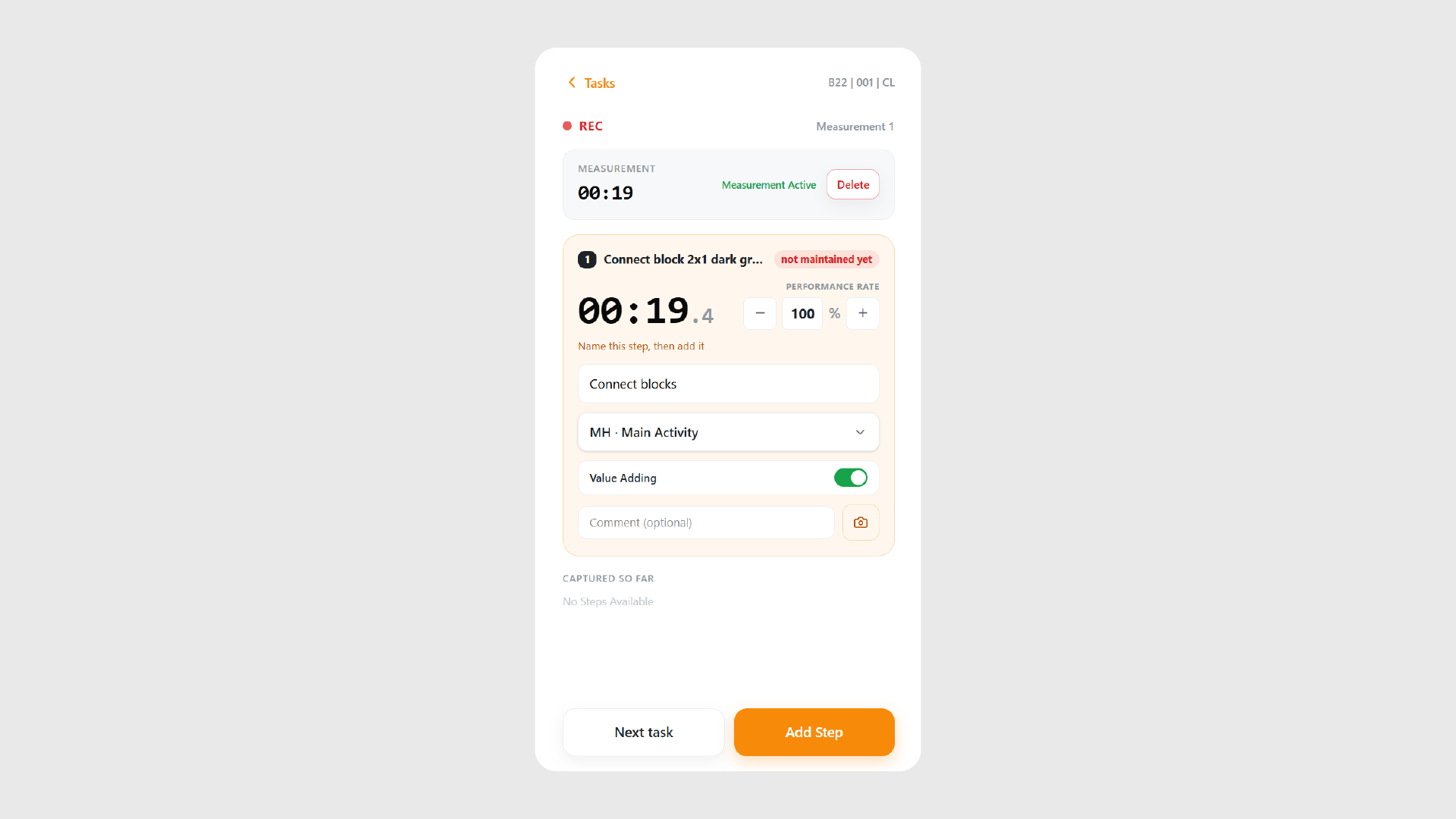
Unlike the building-block methods, this one is built around measurements: several time studies for one task are maintained and averaged automatically according to REFA. You maintain them where you would expect to: when editing a task, or in the time analysis dialog.
Measure times on the line
A mobile web app for time studies is available for exactly that. Measurements are taken right at the line and the results land directly in the TAKTIQ backend, with no intermediate step and no re-entry. The same interface is also available in the desktop client, so measuring and evaluating do not drift apart.
What it changes day to day: measurements are created where the work happens and are immediately available for line balancing and analysis. The path from observation to a reliable target time gets noticeably shorter.
The REFA features start as a Public Preview for all customers using the Time Management Add-On and are activated separately. Just let us know and we will switch the new features on for you.
Start / Help & Support
IQ Pilot: try it out and help shape it
Since the last release, selected users have been able to try the IQ Pilot, our AI-powered assistant built right into TAKTIQ and SEQUIQ. The feedback was clearly positive, and it has already gone into improvements. That is why we are now opening the IQ Pilot to everyone as part of an extended trial phase, so that even more hands-on experience can feed into its development.
In short: the IQ Pilot answers your questions about TAKTIQ and SEQUIQ right inside the application. Clarify terminology, find functions, get step-by-step instructions, or jump to the matching help page with a single click. No context switching, no searching.
Where: start the IQ Pilot at the top right of the main menu, or at any time with Ctrl + Space.
Your feedback counts: the IQ Pilot is under active development. Use thumbs up or down after each answer, and add a short comment where it helps. That is how you help us improve answer quality where it matters. All feedback is evaluated anonymously.
More capabilities are already being planned. If you have questions, please contact our support team or talk to your consultant directly.
Further Improvements
- Interface to PTC Windchill: line balancing data from PTC Windchill can now be taken over directly and the line balancing optimised in TAKTIQ transferred back. This removes the manual data comparison between process planning and line balancing, and keeps both systems consistent. Talk to us if an integration with PTC Windchill is an option for you!
(Document / Import Data) - Adjust the utilization indicator to your needs: the point at which utilization counts as critical differs from plant to plant. Thresholds and colours can now be defined freely. Administration can specify them centrally for a customer or for individual planning areas, and the original state can be restored at any time.
(Analyze / Workplaces) - Ergonomic screening with KIM (LMM): the Key Indicator Method is available as a prototype for ergonomic assessment at workplace level. Talk to us if you would like to try the demo version. We will activate it for you.
(Document / Ergonomics) - Noticeably faster to work with: switching between modules and building the task relations column in large task lists are both considerably quicker now. It shows in everyday work above all when handling extensive constraint data.
(Start / Operate & Navigate) - Workplace complexity at a glance: the Line Balancing KPI Report now shows the number of order variants as a separate column in the Utilization Details band, right after the number of tasks. It can be aggregated across every level of the plant structure, and the Variant Overview shows the value as well. This makes it immediately clear how much variety a workplace actually has to handle.
(Analyze / Workplaces) - Filter on individual model descriptions: task lists can now be filtered on a single model description even when a column holds several of them. That saves detours in model-related evaluations.
(Analyze / Tasks) - Set target piece counts per order type: when generating an order program you can now choose whether the target piece counts are specified per model or per order type. This makes it possible to plan a program specifically around the order types that matter for line balancing. Along with this extension, order types can now also be managed in the Order Generation module itself.
(Optimize / Order Program) - Line balancing KPIs per order type: the Line Balancing KPI Report now provides the KPIs not only per model but, if you want, also per order type. If you evaluate your line by sub-types rather than by models, such as engine variants or model plus drive type, this gives you exactly the figures that matter. The included order types can be defined directly in the configuration dialog.
(Analyze / Workplaces)
All TAKTIQ Modules at a Glance
Expand TAKTIQ flexibly with our modules. Customize the solution to your individual production and achieve maximum benefit for your specific requirements.


