← Releases
Release 2026.6
TAKTIQ Release 2026.6 brings efficiency and autonomy: the automatic derivation of precedence relations speeds up access to line balancing, new user management reduces administration effort – and with the IQ Pilot (preview), AI support is available directly in the application for the first time.
Highlights:
- Start Optimization Immediately Without Manual Maintenance of Precedence Relations
- Control User Rights Independently
- Use AI Support Directly in Your Work Context (Preview)
Customers with Long Term Support (LTS) will receive the new features with the next LTS release in September 2026.
Questions about the release?
Just write to me!

Share post
Document / Line Balancing Constraints
Faster Line Balancing: Derive Precedence Relations Automatically and Use Them Immediately
Especially in early planning phases, there is often a lack of complete documentation of precedence relations. At the same time, it is precisely this requirement that is crucial for valid balancing. With release 2026.6, TAKTIQ solves this conflict of objectives: precedence relations can be automatically derived from existing, already proven line balancing states.
The derivation is based on valid task sequences from historical data sources such as projects, plan states, or existing line balancing scenarios. The approach is pragmatic: If tasks have occurred in any order in the past, there is no fixed precedence relation between them. In this way, a robust set of constraints is automatically created, which can be used directly in planning.
From Data To Usable Constraints In Just A Few Clicks
Creation takes place in just a few steps and without complex preparation. Users select the desired data sources, optionally define additional assumptions—such as precedence per model, order variant, or working position—and immediately receive a new line balancing scenario with the derived precedence relation.
A typical application scenario: For a new variant, several similar line balancings already exist. Instead of documenting all Precedence Relation manually, planning starts directly with automatically derived Constraints. This quickly creates an evaluable and valid planning basis from which initial optimization potential can be realized.
How Restrictive Are The Automatic Precedence Relations?
The effect depends on the data used: Homogeneous source data leads to more restrictive relationships, while more heterogeneous data opens up greater flexibility for optimizations. Users can specifically control how restrictive the Constraints are through configurable options. For example, Precedence Relations can only be created if work elements occur in the same order or are executed at the same working position. This ensures that degrees of freedom are preserved where needed.
Once Created – Usable In Any Type Of Line Balancing Method
The automatically generated Precedence Relations are then available in all types of line balancing: manual, interactive, and automatic. They can serve either as the sole basis or be specifically combined with existing constraints.
This enables a completely new working approach:
- Start Quickly with Automatically Derived Relations
- Generate Initial Valid Results
- Then Specifically Add Domain-Specific Constraints
At the same time, full control is maintained! The automatic relations can be activated or deactivated at any time, displayed in task lists, or visualized as a graph.
Result: A significantly faster entry into optimization while maintaining transparency and control.
Install & Configure
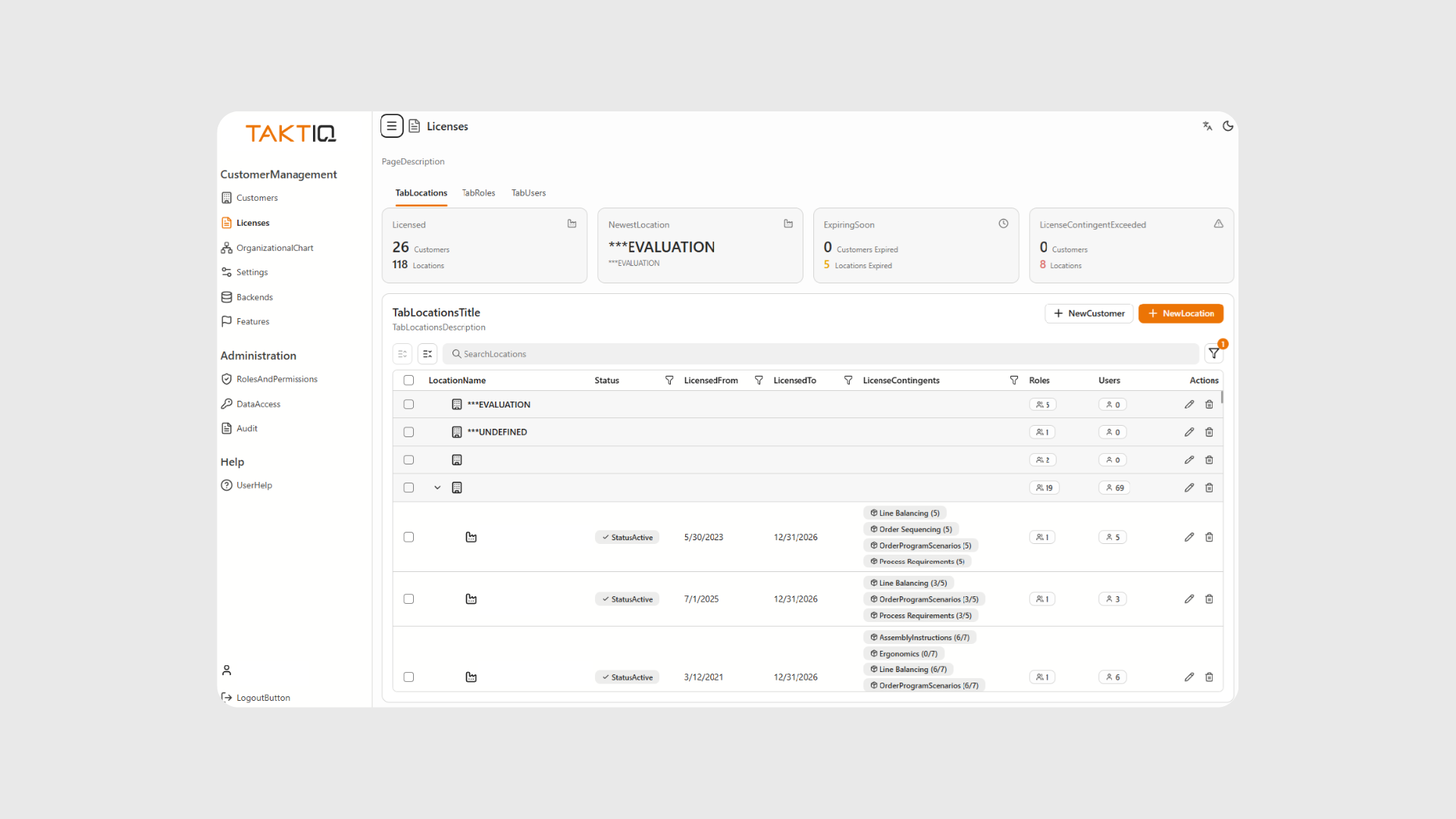
Flexible User Management in Your Own Hands
With the new Customer Management Web App, user management is placed in the hands of the user organization. Companies can manage users, licenses, and permissions independently—directly in the browser and without additional coordination loops.
Licenses can be assigned or adjusted for individual users, while read and write permissions for planning areas can be flexibly controlled. This provides greater speed and flexibility, especially in dynamic projects.
Respond Faster When Requirements Change
A typical real-world case: A new team member is integrated into a project at short notice, or responsibilities within a team change. With the new web app, the necessary permissions can be assigned or adjusted directly—without delays and without dependency on external processes.
Users also maintain full transparency when managing access rights or switching between projects: Who can read, who can write, who works in which area—everything can be controlled directly.
Greater Efficiency In Onboarding And Daily Operations
New users can be quickly onboarded and receive exactly the permissions they need. At the same time, ongoing maintenance of the user structure becomes simpler and more transparent. Roles and quotas remain clearly defined, ensuring a structured framework.
Result: Less coordination effort, faster processes, and smooth user management.
Start / Help & Support
IQ Pilot: AI Support Directly in the Work Context
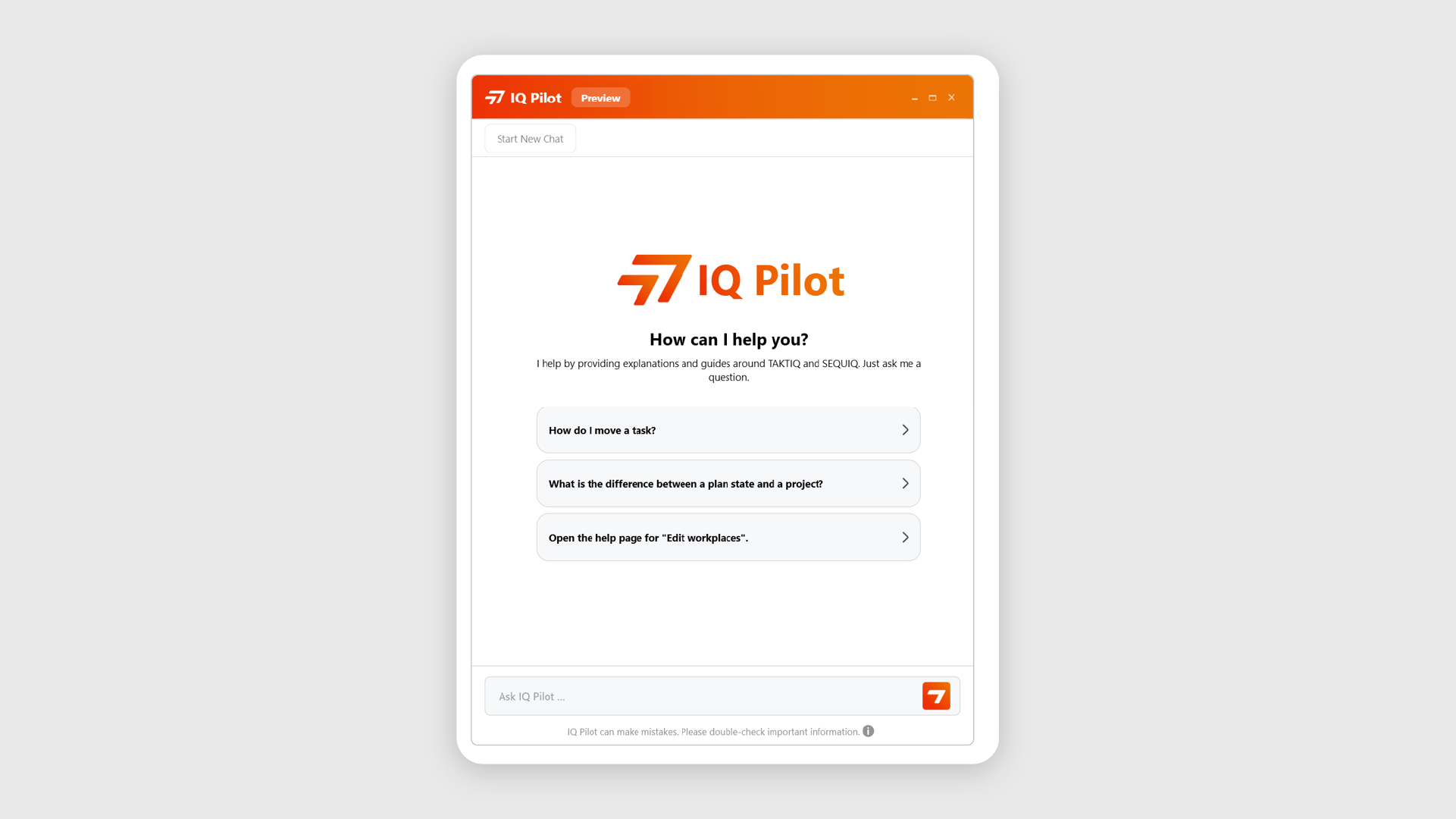
AI is entering production planning: With Release 2026.6, we introduce the IQ Pilot—an AI-powered assistant directly integrated into TAKTIQ.
Have you experienced this? You are in the middle of line balancing, want to move a task, and wonder: Why does the Workplace not allow this? Previously, this meant interrupting your workflow, opening documentation, and searching for the right section. With the IQ Pilot, that is now a thing of the past. Enter your question, get an answer, and continue working—without leaving your workflow. And if you want to dive deeper, the IQ Pilot takes you directly to the relevant help page in our proven user documentation with just one click.
What The IQ Pilot Does For You:
- Explain technical terms – What is usable cycle time? What does excess cycle time mean? Clear explanations at the push of a button.
- Find functions – You know what you want to do, the IQ Pilot shows you where.
- Provide step-by-step guidance – e.g. “How do I create a new Workplace?”
- Reveal connections – e.g. “Why do my task changes affect other planning states?”
- Jump to help pages – Directly to the relevant documentation page without searching
A practical example: You ask, “How do I group multiple tasks?”
→ The IQ Pilot explains when grouping makes sense, shows the procedure step by step in constraint maintenance, and links directly to the relevant help page if you want to explore further.
The IQ Pilot reduces onboarding time and supports both new and experienced users. Knowledge about functions, relations, and new features is always available and directly accessible.
This is just the beginning – more features are already in planning!
This is just the beginning – more features are already in planning!
Early Access – Become A Pioneer Now
The IQ Pilot launches with Release 2026.6 as an early access feature for selected users.
If you are part of the program, you will find the IQ Pilot under Start / Help and Support in the menu, via the IQ Pilot icon in the title bar, or using the keyboard shortcut Ctrl + Space.
The reason for Early Access: The best answers are based on real questions from everyday planning!
Your feedback—whether thumbs up, a short comment, or a questionnaire—flows directly into further development. Evaluation is carried out exclusively in anonymized form.
Would you like to test the IQ Pilot in advance and help shape its development?
Contact us at support@taktiq.de or speak directly with your consultant.
Further Improvements
- Only relevant columns in the Line Balancing KPI report: Model columns that are not part of the current production program are no longer included in exports. This results in clearer reports that can be used directly without post-processing—especially beneficial for model-based analyses. (Analyze / Workplace KPIs)
- Full control for batch editing: The “All” option now only applies to visible, filtered elements. You edit exactly what you see—without the risk of unintentionally changing additional elements. (Document)
- Constraints clearer in task lists: All relevant constraint columns are now available at the top level and can be arranged in any order. This reduces navigation effort and makes maintenance more intuitive. (Document / Constraints)
- Discard constraints with just a few clicks: Constraints can now be discarded for all tasks with just a few clicks. This is helpful when experimenting, when maintenance needs to be restarted from scratch, or, for example, when incorrect constraints have been introduced into the project via an import. (Document / Constraints)
All TAKTIQ Modules at a Glance
Expand TAKTIQ flexibly with our modules. Customize the solution to your individual production and achieve maximum benefit for your specific requirements.


